Cutout Service
The Cutout Service returns image cutouts from the surveys hosted at LIneA. DES DR2 is public. Each user only reaches the other surveys they have data rights for.
The web interface and the REST API are two separate ways in. The form does not appear in the code examples, and the code examples do not depend on the form.
Web interface
Open https://cutout.linea.org.br. The form is on the left and the HiPS map (Aladin Lite) is on the right for DES DR2.
- In Survey, select
DES DR2. - Enter RA (deg) and Dec (deg) in decimal ICRS degrees, or center the map and use the search button to copy the field center.
- Radius (arcmin) is the radius in arcminutes. The maximum is 30′.
- In Format, choose
FITSorPNG. For PNG, RGB color composite builds the color image; on DES DR2 the presets aregri,riz, andizY. Without the composite, Band selects one filter (g,r,i,z,Y). - Up to 5′, Download returns the file immediately. Above that, the button becomes Queue job.
- Add region collects positions and Queue jobs submits them one at a time. Bulk Coordinates accepts pasted
RA Decpairs or a CSV with the headerra,decand optional columnsband,format,radius,color,rgb_bands. Theradiusin that list is also in arcminutes. - Queued Jobs follows the phase and downloads the files, including as a ZIP.
The list stays in the browser where you opened the Cutout Service, and the file leaves the server after 7 days
Queued Jobs is stored in the browser where you opened cutout.linea.org.br. You can close that tab and return to it. The list does not appear in another browser or on another computer. The asynchronous job and the file are deleted from the server 7 days after creation. Download before that. After the deadline the list may still show up in that same browser, but the download no longer finds the file.
After login, Survey lists the public surveys and the ones the account has data rights for.
REST API
The examples below call
https://cutout.linea.org.br
from Jupyter. DES DR2 (ID=des_dr2) does not require an account. Every synchronous cutout on this page uses a radius of 0.5′, under 1′.
| Use | Method and path | What comes back |
|---|---|---|
| Immediate cutout | GET or POST /api/sync |
The file, application/fits or image/x-png |
| Create a job | POST /api/async |
303 See Other, a Location header, and a job JSON document |
| Inspect a job | GET /api/async/{job_id} |
JSON with phase, parameters, tasks, and results |
| Phase | GET /api/async/{job_id}/phase |
Plain text: QUEUED, EXECUTING, COMPLETED, ERROR, or ABORTED |
| Abort | POST /api/async/{job_id}/phase with PHASE=ABORT |
The new phase, as text |
| Download | GET the result download_url |
The file |
GET /api/async lists the jobs for the account, or for the anonymous session when there is no token.
On LIneA JupyterHub, requests, astropy, and matplotlib are already available. Elsewhere: pip install requests astropy matplotlib.
Token
The token identifies your account to the API. With it, the service returns the surveys you have data rights for, and you can also retrieve a job from another machine. DES DR2 does not need one.
- Sign in at https://cutout.linea.org.br.
- Click your username in the upper-right corner.
- Select API token. The page is also https://cutout.linea.org.br/users/~token/.
- Copy the key shown on that page.
Store the key in the CUTOUT_TOKEN environment variable. The value below is fake: replace it with the key from your page. Regenerate token deletes the old key and creates a new one.
export CUTOUT_TOKEN="0123456789abcdef0123456789abcdef01234567"
If the notebook is already open, export does not reach it. In the first cell, do the same with your key:
import os
os.environ["CUTOUT_TOKEN"] = "0123456789abcdef0123456789abcdef01234567"
The request reads that variable and puts the word Token and a space in front of it. This call downloads an LSST DP1 image, an example of a restricted survey. The account needs data rights for it. DES DR2 does not use this line.
import os
import requests
from IPython.display import Image, display

session = requests.Session()
session.headers["Authorization"] = f"Token {os.environ['CUTOUT_TOKEN']}"

response = session.get(
    "https://cutout.linea.org.br/api/sync",
    params={
        "ID": "lsst_dp1",
        "POS": "CIRCLE 53.096 -28.024 0.008333",  # 0.5 arcmin
        "BAND": "g",
        "format": "png",
    },
    timeout=60,
)
response.raise_for_status()
display(Image(data=response.content))
Keep your key secret
Anyone with the key can use your account. Do not send it in a message and do not leave the real key in a notebook you will share.
Without a token, a job created at /api/async is bound to the sessionid cookie on the response. Later calls must send that cookie again. A requests.Session() does this. A bare requests.get on the result URL returns 403.
The SODA subset this service implements
Requests use SODA parameters. The asynchronous job lifecycle follows UWS. Names are case-insensitive: ID and id are the same parameter, as are POS, BAND, and PHASE.
ID is the release. For DES DR2 the value is des_dr2. BAND is a filter of that release (g, r, i, z, Y).
POS describes the region, in ICRS degrees:
| Form | Syntax | Cutout |
|---|---|---|
CIRCLE |
CIRCLE ra dec radius |
A square on the sky whose side is twice the radius. The radius is an on-sky angle, in degrees. |
RANGE |
RANGE ra_min ra_max dec_min dec_max |
A right ascension and declination rectangle. |
POLYGON |
POLYGON ra1 dec1 ra2 dec2 ... |
The box that encloses the vertices. At least three vertices are required, ordered counter-clockwise. |
Each request accepts one ID and one POS. Repeating either one returns 422.
RANGE is rejected by the radius check
A small POS=RANGE currently returns 422 with a message that the radius exceeds 30′. The check reads the box numbers out of order. The examples use CIRCLE and POLYGON.
Synchronous mode accepts one band. Asynchronous mode can take more than one BAND and creates one task per filter. At creation, PHASE=RUN dispatches the job. The response is 303, with Location pointing at /api/async/{job_id}. The job document is JSON. The phase, at /phase, is plain text.
This subset leaves out, on purpose:
- An XML job document, VOSI capabilities, and a DALI examples endpoint. The client is
requests. - Client-set
DESTRUCTIONandEXECUTIONDURATION. The asynchronous job and the file are deleted 7 days after creation. - Plain-text error codes. An error comes back as JSON
{"detail": "..."}. - Extra parameters, outside SODA:
format(fitsorpng),color, andrgb_bands.
Parameters
| Parameter | Required | Value |
|---|---|---|
ID |
yes | Release identifier. In the public examples, des_dr2. A restricted release responds only when the account has data rights for it. |
POS |
yes | CIRCLE or POLYGON, as above. |
BAND |
yes | Filter. On DES DR2: g, r, i, z, Y. |
format |
no | fits (default) or png. |
color |
no | true with format=png builds the color PNG from rgb_bands. |
rgb_bands |
no | Three filters, such as gri, g,r,i, or g r i. The default is gri. |
PHASE |
for async | RUN at creation. ABORT stops a job that is still running. |
RUNID |
no | Opaque label, returned in the job field run_id. |
The CIRCLE radius is in degrees. One arcminute is 1/60 of a degree.
0.5′ = 0.008333°
1′   = 0.016667°
5′   = 0.083333°
Above 5′ the /api/sync endpoint returns 422 and points at /api/async. The radius must be smaller than 30′.
Why a cutout is slow
Four causes cover almost every slow cutout.
- Area. The side grows with the radius and the pixel count grows with the square. 0.5′ is a 228-pixel square, about 0.2 MB as FITS. 5′ is past 2,000 pixels and around 20 MB.
- Mosaic. The DES DR2 coadd is a tile grid. When the field lands on more than one tile, the service opens each image and combines them. Tiles that do not share the same grid are reprojected first.
- Color.
color=truereads three filters. If each filter crosses several tiles, that is three mosaics before the RGB composite. - Footprint edge. Outside the area covered by the release the response is
422(No files found for band ...). On the edge the file is still returned, and a pixel with no tile arrives as zero.
A 0.5′ field on a single tile returns in about a second. The same center at a 6′ radius, band g, took about 30 seconds and returned 30 MB, because the square covers several tiles.
Jupyter examples
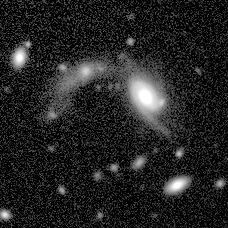
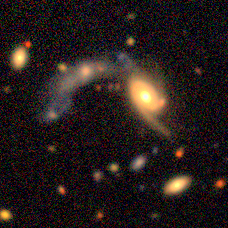
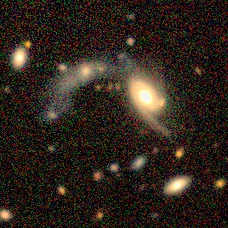
The position is RA = 41.22° and Dec = −35.56°, inside DES DR2. display shows the image in the notebook. The figures on this page are the response of these calls.
Single-band PNG
import requests
from IPython.display import Image, display

response = requests.get(
    "https://cutout.linea.org.br/api/sync",
    params={
        "ID": "des_dr2",
        "POS": "CIRCLE 41.22 -35.56 0.008333",  # 0.5 arcmin
        "BAND": "g",
        "format": "png",
    },
    timeout=60,
)
response.raise_for_status()
display(Image(data=response.content))
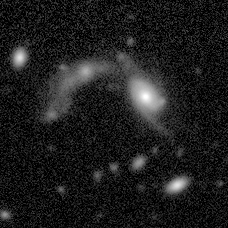
Band i of the same field changes only the filter. A single-band PNG already carries the service stretch, ready to look at.
response = requests.get(
    "https://cutout.linea.org.br/api/sync",
    params={
        "ID": "des_dr2",
        "POS": "CIRCLE 41.22 -35.56 0.008333",
        "BAND": "i",
        "format": "png",
    },
    timeout=60,
)
response.raise_for_status()
display(Image(data=response.content))
Color PNG
color=true reads g, r, and i and returns an RGB image. BAND stays in the request.
response = requests.get(
    "https://cutout.linea.org.br/api/sync",
    params={
        "ID": "des_dr2",
        "POS": "CIRCLE 41.22 -35.56 0.008333",
        "BAND": "g",
        "format": "png",
        "color": "true",
        "rgb_bands": "gri",
    },
    timeout=60,
)
response.raise_for_status()
display(Image(data=response.content))
riz is the other usual composite. The call is the same, with rgb_bands changed.
response = requests.get(
    "https://cutout.linea.org.br/api/sync",
    params={
        "ID": "des_dr2",
        "POS": "CIRCLE 41.22 -35.56 0.008333",
        "BAND": "r",
        "format": "png",
        "color": "true",
        "rgb_bands": "riz",
    },
    timeout=60,
)
response.raise_for_status()
display(Image(data=response.content))
Polygon
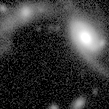
POLYGON cuts the box around the vertices. The four corners below span about 0.5′ in declination, still in one synchronous call.
response = requests.get(
    "https://cutout.linea.org.br/api/sync",
    params={
        "ID": "des_dr2",
        "POS": "POLYGON 41.216 -35.564 41.224 -35.564 41.224 -35.556 41.216 -35.556",
        "BAND": "r",
        "format": "png",
    },
    timeout=60,
)
response.raise_for_status()
display(Image(data=response.content))
FITS for measurement
The FITS file stores counts per second, as float32, without the PNG stretch. To see the galaxies in the notebook, compress the scale. This file is 228×228 pixels and about 0.2 MB.
import requests
from io import BytesIO
import matplotlib.pyplot as plt
from astropy.io import fits
from astropy.visualization import AsinhStretch, ImageNormalize, ZScaleInterval

response = requests.get(
    "https://cutout.linea.org.br/api/sync",
    params={
        "ID": "des_dr2",
        "POS": "CIRCLE 41.22 -35.56 0.008333",  # 0.5 arcmin
        "BAND": "g",
        "format": "fits",
    },
    timeout=60,
)
response.raise_for_status()

data = fits.open(BytesIO(response.content))[0].data
norm = ImageNormalize(data, interval=ZScaleInterval(), stretch=AsinhStretch())
plt.figure(figsize=(4, 4))
plt.imshow(data, origin="lower", cmap="gray", norm=norm)
plt.title("DES DR2 g")
plt.tight_layout()
plt.show()
origin="lower" puts north at the top of this FITS image. The g-band PNG above is the same sky, already stretched by the service.
Above 5′
The synchronous endpoint refuses a large radius. A 6′ CIRCLE on /api/sync returns:
{"detail":"Cutout radius 6.0 arcmin exceeds the synchronous limit of 5 arcmin. Please use POST /api/async instead. Expected processing time is 36s."}
The asynchronous job keeps the same Session from the POST through the download. Without a token, it carries the cookie. With a token, uncomment the header and the cookie is no longer required. allow_redirects=False keeps Location. The phase is text, not JSON.
Download the file within 7 days. After that the server deletes the job and the result.
This case is slow on purpose: several tiles and about 30 MB. The imshow is the same one used for the small FITS file.
import time
import requests
from io import BytesIO
import matplotlib.pyplot as plt
from astropy.io import fits
from astropy.visualization import AsinhStretch, ImageNormalize, ZScaleInterval

session = requests.Session()
# session.headers["Authorization"] = f"Token {os.environ['CUTOUT_TOKEN']}"

response = session.post(
    "https://cutout.linea.org.br/api/async",
    data={
        "ID": "des_dr2",
        "POS": "CIRCLE 41.22 -35.56 0.100000",  # 6 arcmin
        "BAND": "g",
        "format": "fits",
        "PHASE": "RUN",
    },
    allow_redirects=False,
    timeout=60,
)
response.raise_for_status()
job_url = response.headers["Location"]

phase = ""
for _ in range(40):
    phase = session.get(f"{job_url}/phase", timeout=60).text.strip()
    if phase in {"COMPLETED", "ERROR", "ABORTED"}:
        break
    time.sleep(3)
else:
    raise TimeoutError(phase)

detail = session.get(job_url, timeout=60).json()
if phase != "COMPLETED":
    message = detail["tasks"][0].get("error_message")
    raise RuntimeError(f"{phase}: {message}")

fits_response = session.get(detail["results"][0]["download_url"], timeout=300)
fits_response.raise_for_status()
data = fits.open(BytesIO(fits_response.content))[0].data

norm = ImageNormalize(data, interval=ZScaleInterval(), stretch=AsinhStretch())
plt.figure(figsize=(6, 6))
plt.imshow(data, origin="lower", cmap="gray", norm=norm)
plt.title("DES DR2 g, 6 arcmin")
plt.tight_layout()
plt.show()